
About this guide
This guide has been developed by members of the ALT/Jisc UK XR community. It builds on a community workshop where participants explored the use of augmented reality (AR) and mixed reality (MR) for teaching and learning.
The workshop included:
- a scoping exercise to ensure we are all focused on the same issues
- a “crazy 8s” ideation activity to explore future applications of AR and MR
The outputs informed this guide, which focuses on:
- the present – current practice and case studies
- the future – emerging opportunities and ideas
Augmented reality
Introduction provided by Sam Berry, Swansea University
Augmented reality (AR) overlays digital content onto the physical world in real time, enhancing a user’s view of their environment. This digital content may include images, 3D models, audio, video or interactive elements.
AR is commonly accessed through devices such as smartphones, tablets, smart glasses or head-mounted displays. The user continues to see the real world, with digital elements layered over it.
For example, a learner might point a mobile device at an image in a textbook and see it transform into an animated chemical reaction.
Types of augmented reality
AR can take several forms:
Trigger-based AR
- Initiated by a recognised stimulus such as an image, object or GPS location
- Often includes:
- Marker-based AR: uses a visual marker (eg QR code or image)
- Location-based AR: uses GPS data (eg displaying historical information or digital content when a learner reaches a specific location)
View-based AR
- Enhances or adds to the physical environment without a specific marker
- Includes:
- Indirect augmentation: recognises and alters real-world objects (eg a wall or mannequin)
- Markerless (non-specific) AR: displays digital content unrelated to the environment
Projection-based AR
- Projects digital information directly onto physical surfaces
- Does not require a personal device to view the content
Mixed reality
Mixed reality (MR) builds on AR by enabling deeper interaction between digital and physical elements.
Like AR, users can still see the real world. However, in MR:
- digital objects respond to the physical environment
- virtual elements can be placed accurately in space
- users can interact with and manipulate virtual objects
For example, a learner using a head-mounted display may view a 3D anatomical model that:
- changes size depending on their distance
- remains anchored to a fixed point in the room
- can be explored or manipulated in real time
This creates a more immersive and realistic experience than standard AR, where content is often simply overlaid.
Benefits and challenges
Both AR and MR can support a wide range of pedagogical approaches, including inquiry-based learning, simulations, problem-solving activities, and game-based learning. Research has shown that the use of AR and MR can enhance learners' empathy, engagement, and overall learning experience. However, there are several limitations and challenges, such as usability, inclusivity and privacy that must be addressed for effective and ethical deployment in further and higher education contexts.
Current practice
We worked with the UK XR community to gather examples of how AR and MR are being used across further and higher education.
Case study: the University of Sheffield
Contributor: Dave Holloway, senior digital learning advisor, digital learning team
How did you use augmented or mixed reality?
We explored the use of AI and MR to address a common challenge in student engagement: how to include a wider range of voices in academic discussions and events. Traditional formats, such as conference panels, often rely on confident speakers who are comfortable presenting to large audiences. This can unintentionally exclude students who face barriers such as anxiety, scheduling conflicts or health-related challenges.
To address this, we used our extended reality (XR) platform, Wonda, to create interactive AI-generated avatars representing student perspectives. We worked with students who were unable to take part in a live panel at an education conference and conducted structured conversations based on a set of pre-defined questions about their experiences of using AI in their studies. Their responses were transcribed, summarised and transformed into prompts to power the avatars. Students were also involved in shaping how their avatars appeared, helping to ensure their views were accurately represented.
During the conference, these avatars were used alongside live speakers, written responses and video contributions. Attendees were able to ask questions and interact with the avatars in real time. Responses were designed to remain grounded in the students’ original input, ensuring authenticity and preventing the avatars from generating views beyond those expressed. This created a more interactive and flexible way of incorporating asynchronous contributions into a live setting.
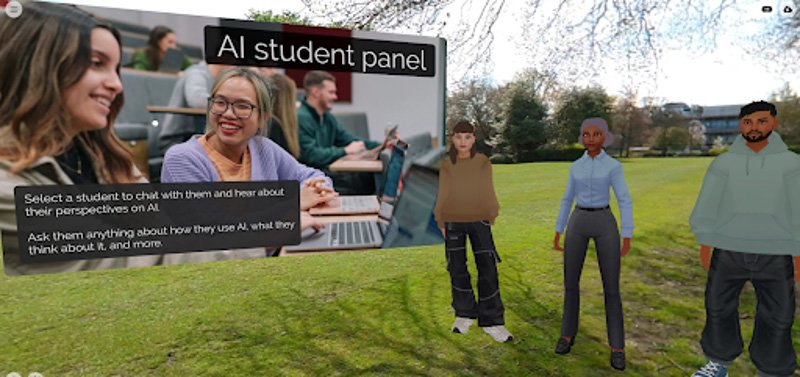
A screenshot of AI avatars in the mixed reality experience.
What was the impact?
This approach enabled us to create a more inclusive and representative panel format, where participation was not limited to those physically present or comfortable speaking live. Students who might otherwise have been excluded were able to contribute meaningfully and have their perspectives heard.
The experience also enhanced audience engagement. Attendees responded positively to the interactive nature of the avatars, finding them relevant and valuable rather than a novelty. The use of AI aligned closely with the topic of the session, which further strengthened its impact.
More broadly, this work demonstrated how AI and mixed reality can be used to create virtual representations of student perspectives and integrate them into live academic contexts. It showed how technology can support more flexible, inclusive and accessible approaches to student engagement, helping to ensure a wider range of voices are represented in university conversations.
By embracing AI avatars, we’re not replacing human connection - we’re expanding it. We’re acknowledging that not every student thrives under a spotlight, but every student has something valuable to say. As educators, it’s our responsibility to create spaces where all voices can be heard, not just the loudest. If we want a truly inclusive academic environment, then we have to keep rethinking the stage - not just who stands on it, but how we invite people there in the first place.
Read the blog post Letting every voice be heard: how AI avatars are amplifying student perspectives by Dave Holloway.
Case study: Chichester College Group
Contributors: Rebecca McCardle, digital innovation lead and Colin Hughes, digital learning designer
How did you use augmented or mixed reality?
At Chichester College Group, we have been developing the use of immersive technologies to enhance teaching and learning. Building on our existing work with virtual reality, we introduced mixed reality (MR) to students studying creative subjects at our Northbrook campus to explore its potential within artistic practice.
One of our students was particularly interested in the role of digital technologies in art, especially in relation to authorship, copying and appropriation. MR provided a practical way to support this exploration within their coursework.
We used Contour, a mixed reality application, to overlay digital images onto real-world environments and enable accurate tracing at scale. This approach is useful for set design, mural work, and enlarging concept illustrations accurately.
Using a Meta Quest 3 headset in passthrough mode, the student projected an image onto a physical canvas and traced the outline directly onto the surface. Once this stage was complete, the student continued the work independently without the use of the headset. This enabled the technology to support the initial stages of the creative process while maintaining a focus on traditional artistic development.
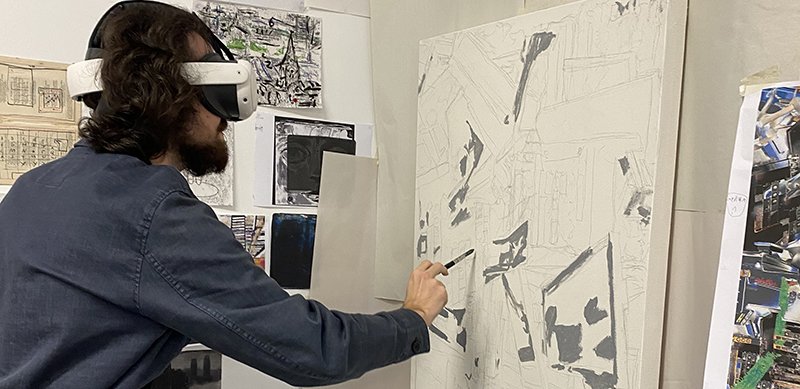
A learner using Contour on a virtual reality headset to produce artwork.
What was the impact?
New technology can feel daunting, and gaining early engagement from staff is often challenging. Providing concrete examples to share with both staff and students helps shift the narrative, making the technology feel practical and accessible rather than abstract.
The project was shared at a college-wide Innovation Forum, generating discussion and increasing interest in immersive technologies across curriculum areas. As a result, staff engagement grew, leading to the delivery of introductory sessions to build confidence in using virtual reality (VR) and MR tools.
This work also highlighted the role of creative curriculum areas in piloting new approaches. Creatives are often the first to question, challenge, and embrace new ideas and technologies. We’re fortunate to be in a position where we can tap into that curiosity and openness to innovation.
What have you learnt and what are your top tips?
A key learning point is the importance of aligning XR use with the specific needs of the discipline. Identifying where immersive technologies add clear value helps ensure they enhance, rather than complicate, the learning experience. For instance, one of our earliest uses of immersive technologies was health and safety on an aircraft for cabin crew students who were unable to attend a site visit. Using Aviar simulation allowed them to access a more realistic learning experience.
Effective curriculum design is essential. XR should be embedded with clear purpose to avoid creating unnecessary barriers for learners.
Providing structured training for both staff and students is also important. This includes ensuring users are confident in preparing and maintaining equipment ahead of sessions.
If we were to do this again, we would engage even earlier with the UK XR community. It was an invaluable resource when we were at the early stages of using the tech. It is easy to feel as though you are lagging behind. Knowing other institutions were having similar challenges was reassuring and of course sharing good practice examples and solutions was extremely valuable.
Case study: University of Leeds
Contributor: Dr Ryan Kromer, associate professor in engineering geology and programme lead MSc Engineering geology
How did you use augmented or mixed reality?
Mixed reality (MR) was used to support teaching on geohazards and coastal processes along the Jurassic Coast. High-resolution 3D models were created using drone photogrammetry and lidar, and integrated into interactive MR environments alongside supporting materials, including maps, photos, cross-sections, and design charts.
These sessions were delivered as small group guided, instructor-led exercises, where students collaboratively explored the models, interrogated geological features, and discussed interpretations in real time. Models could be viewed at different scales depending on the learning objective, from full-scale landscapes that helped students understand structural features and geohazard processes, to highly detailed representations that allowed close inspection of the geology and outcrop features.
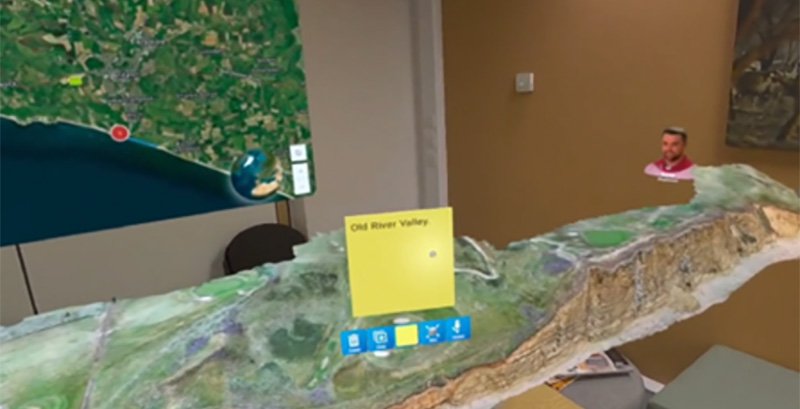
An example of the 3D model shown via mixed reality.
What was the impact?
Across multiple cohorts, MR consistently generated high levels of student engagement and positive feedback, with students reporting increased confidence in interpreting geological structures and geohazard processes. MR provided students with a strong felt sense of the geology and landscape, helping them understand scale, spatial relationships, and environmental context. Many students described the experience as feeling like they were on site and found the immersive environment engaging and easy to interact with.
As one student reflected:
"I really liked how immersive it felt. The virtual environment was super engaging and made learning more about the site easier. It was fun to be fully in the experience and interact with everything whilst being so far away."
A key impact was improved spatial and conceptual understanding. Students reported that MR helped them see the whole picture, linking geological structure, geomorphology, geohazards and the tools used to interpret them within a single 3D environment. The ability to manipulate models, view features from multiple angles, and integrate multiple datasets supported interpretation and helped students connect theory to real-world contexts.
As one student noted:
"It was helpful to understand the geology and geohazards because being immersed in the environment made it easier to picture the different features and processes. Seeing everything in a more visual and interactive way made the information feel clearer and easier to remember than watching it on a computer."
The collaborative, instructor-led format was particularly impactful, enabling students to discuss interpretations, share perspectives, and be guided towards key features, closely mirroring field-based learning.
Another student reflected that:
"It was really good to be able to view the same things at the same time; the instructor was able to point out features which we could all discuss together."
Most students expressed a preference for the collaborative MR experience over a fully immersive VR experience that was delivered alongside it. Students noted that being able to see the room, interact naturally with peers, and maintain awareness of their surroundings made MR feel more comfortable and less disorienting, while still providing a strong sense of realism and immersion.
What have you learnt and what are your top tips?
The following are my top tips:
- Start with the learning objectives and use MR where it adds clear value, particularly for understanding complex spatial relationships and 3D structures
- Design activities around discussion and collaboration. One of MR's greatest strengths is enabling learners to explore and interpret data together rather than in isolatio
- Have additional technical support for onboarding and troubleshooting, it is difficult to both lead a session and support headset usage
- MR is a complementary tool to site visits, not a replacement
- Integrate multiple data sources. Combining 3D models with maps, cross-sections, and supporting media greatly enhances conceptual understanding and helps learners see the bigger picture
Next time I do this type of activity, I would include a greater variety of sites or environments and design more interactive activities. Students also requested longer sessions, which would allow more time for exploration, discussion, and interpretation.
One of the most rewarding aspects of using MR was seeing students become genuinely curious, engaged and having fun, as we explored geological environments together. The technology created opportunities for discussion, exploration, play, and shared discovery that are often difficult to achieve using traditional teaching approaches alone.
Future
To explore the future potential of AR and MR, we held a panel discussion with members of the UK XR community. The conversation focused on how these technologies could evolve over the coming years and the opportunities they present for teaching, learning and real-world practice.
We spoke to Josh Gregg, innovation technologies specialist, University of Leeds and Paul Hibbard, professor of psychology, University of Stirling, bringing a range of perspectives about the future of augmented and mixed reality.
See the Beyond the Technology podcast: the future of augmented and mixed reality in education.
Delivering healthcare training through smart glasses
This future-facing example reflects themes raised during the discussion, particularly the potential for AR and MR to support in-context, real-time learning.
We spoke to Tony Payton, senior lecturer in healthcare sciences and Emily Johnstone, PhD student from The University of Manchester about their plans to deliver healthcare training through AR and MR-enabled smart glasses.
Why did you decide to use augmented or mixed reality?
We’re soon going to extend our tracheostomy training work in VR to AR. Our hope is that this may allow critical guidance to be delivered in the moment it is needed, possibly without requiring the user to look away from the patient. In emergency tracheostomy situations, time and clarity are essential. AR enables hands-free, step-by-step support directly in the user’s field of view, reducing cognitive load and helping non-experts to follow a complex clinical algorithm under pressure.
How do you plan to use augmented or mixed reality?
Specifically, we are going to build on our existing GenAI trainer, “AI-Brendan,” originally developed for VR and PC-based learning. In the AR version, it will be delivered via third-generation smart glasses. Here, the avatar of Professor Brendan McGrath will appear in the user’s environment. Using natural language interaction, users can ask questions and receive real-time guidance. For example, the simulation can walk carers of children fitted with a tracheostomy through the emergency algorithm step-by-step, combining conversational AI with visual prompts.
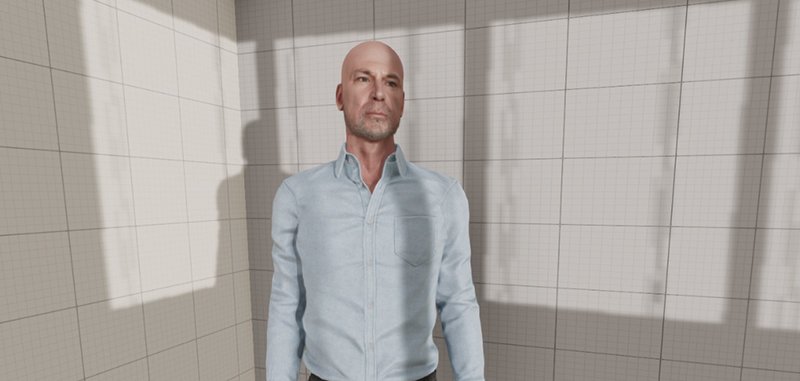
An image of AI-Brendan that is currently used in VR. The avatar is a physical likeness of Professor McGrath and includes a cloned copy of his voice and knowledge training from Brendan. The avatar has recently outperformed human experts in the field of tracheostomy.
What do you hope will be the impact?
The primary impact will be improved safety and confidence in high-risk, low-frequency situations. For carers and families of children with tracheostomies, AR support could be lifesaving by enabling rapid, accurate responses during airway obstruction. In education, it may also offer a powerful bridge between simulation and real-world practice, supporting just-in-time learning and reinforcing procedural knowledge.
What would be your top tips for others wanting to use this technology?
Have a clear use case where AR adds value beyond existing tools (typically situations requiring hands-free, real-time guidance). Co-design with end users (eg clinicians and patients/carers) to ensure usability under pressure. Keep interactions simple and intuitive, and prioritise reliability and accuracy of content, especially in safety-critical contexts.
Expanding virtual laboratories into mixed reality
We also spoke to Shazia Hyatt, senior lecturer at the University of Manchester about their plans to build on their existing virtual laboratory simulations and explore the potential of mixed reality for practical science education.
Why are you interested in mixed reality?
We explored immersive technologies as a way to address some of the challenges associated with practical science teaching. Students often have limited opportunities to repeat techniques, practise decision-making and learn from mistakes before entering a laboratory.
Physical practicals are also constrained by laboratory space, staff time, consumables, safety requirements and access to specialist equipment. Virtual laboratory simulations provided a safe environment where students could practise procedures repeatedly while complementing hands-on practical teaching.
How have you used immersive technologies so far?
In partnership with Virtual Scientia, we created a series of interactive simulations for practical science education. The activities covered techniques including pipetting, PCR, gel electrophoresis, UV imaging, DNA ligation and cloning.
Students worked through realistic laboratory scenarios, made experimental decisions and received outcomes based on their choices. Incorrect decisions could lead to realistic errors or unsuccessful results, helping students understand the consequences of their actions and repeat the activity safely.
The simulations were tested on desktop computers and Meta Quest 3 headsets. The headset version was delivered as a fully immersive virtual reality experience.
What was the impact?
Evaluation of the virtual laboratory simulator showed that 93.7% of students felt it benefited their practical learning in the biosciences and 93.2% wanted to use it alongside in-person practical classes.
Students valued the realism, level of detail and opportunity to prepare for physical practical sessions. The work has also generated interest across biosciences, medicine, pharmacy and chemistry and demonstrated the potential of immersive simulation to support practical skills teaching across a range of disciplines.
What are your future plans?
Building on this work, we are interested in exploring mixed reality experiences using pass-through technology. We hope to understand whether mixed reality can provide additional benefits by combining virtual laboratory activities with awareness of the physical environment.
We are currently seeking partnerships with universities across the UK and would be pleased to freely share and demonstrate the virtual laboratory technology developed through the project. We also welcome opportunities to explore potential applications and support its use in other disciplines and institutional contexts.
What’s next?
This is an evolving area, and we’d like to shape future work with the community.
Join the conversation in our UK XR community to share your experiences, highlight challenges, and tell us what support or resources you’d like us to develop next.
Acknowledgements
With thanks to Sam Berry, University of Swansea; Dave Holloway, University of Sheffield; Rebecca McCardle and Colin Hughes, Chichester College Group; Dr Ryan Kromer and Josh Gregg University of Leeds; Dr Tony Payton and Emily Johnstone, University of Manchester and Paul Hibbard, University of Stirling.
Thanks also go to other members of the Augmented and Mixed Reality Working group from UCL, the Royal College of Art, New City College, University of Lancaster and USP College, who shared their comments and thoughts in the workshop.
References
Carter, M., Egliston, B., 2020. Ethical Implications of Emerging Mixed Reality Technologies
Corrêa, A.G.D., Tahira, A., Ribeir, J.B., Kitamura, R.K., Inoue, T.Y., Ficheman, I.K., 2013. Development of an interactive book with Augmented Reality for mobile learning, in: 2013 8th Iberian Conference on Information Systems and Technologies (CISTI). pp. 1–7
Dick, E., 2021. Balancing user privacy and innovation in augmented and virtual reality. Information Technology and Innovation Foundation
Edwards-Stewart, A., Hoyt, T., Reger, G., 2016. Classifying different types of augmented reality technology. Annual Review of Cybertherapy and Telemedicine 14, 199–202
Greenemeier, L., 2016. Is Pokémon GO Really Augmented Reality? Scientific American